The New Standard of Compression in the Industry
DodaZIP • .dzip Vaults • 100% Memory-Safe Rust
Engineered to replace aging legacy formats. DodaZIP introduces .dzip — combining FastCDC cross-file deduplication, Reed-Solomon self-healing parity, Argon2id + XChaCha20-Poly1305 encryption, and an integrated 3-pass DoD file shredder with universal support for 14 archive formats.
Compatible with Windows 11 / 10 (64-bit) • Free & Open Source (Dual MIT / Apache 2.0) • Read the Documentation →
DodaZip v0.2.0 — Acrylic UI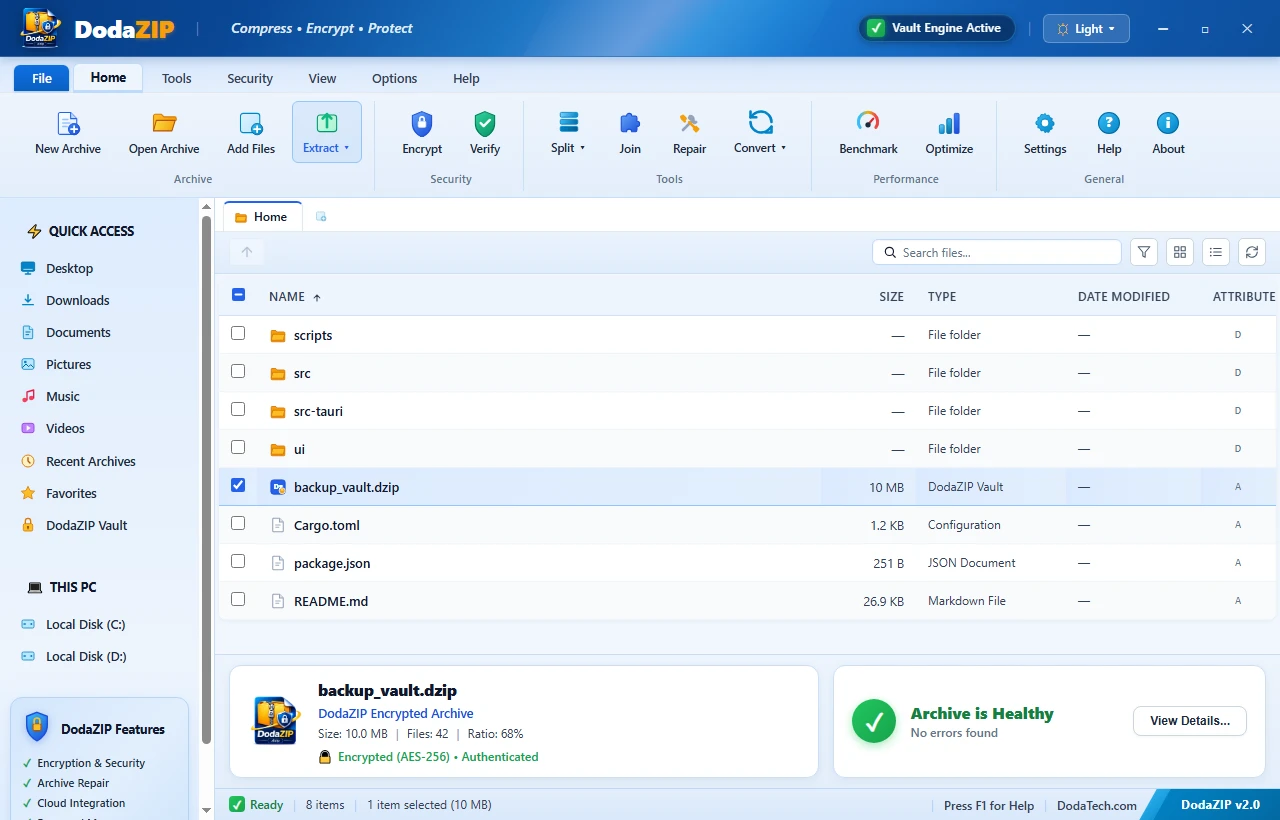
Why Traditional Archivers Belong to the 1990s
7-Zip was released in 1999. WinRAR in 1995. ZIP in 1989. While computers advanced exponentially, compression software stood still.
Zero Self-Healing Protection
In standard ZIP and 7z archives, a single flipped byte from drive bit rot, an interrupted download, or a bad sector destroys your entire archive forever.
Weak, Breakable Encryption
Legacy archivers rely on PBKDF2 key derivation that can be cracked at millions of guesses per second on consumer GPUs. Metadata and filenames remain unencrypted and exposed.
The DodaZip Modern Solution
DodaZip mathematically repairs damaged sectors via Reed-Solomon ECC, deduplicates identical blocks with FastCDC, and seals everything with Argon2id + XChaCha20.
See DodaZip in Action
Engineered with modern Windows 11 Acrylic styling, multi-tab browsing, self-healing parity controls, and deep hardware benchmarks.
Browse Archives Without Extraction
Virtual inspection allows exploring inside `.dzip`, `.zip`, `.7z`, and `.rar` files just like normal Windows folders. Multi-tab navigation with Ctrl+T multitasking.
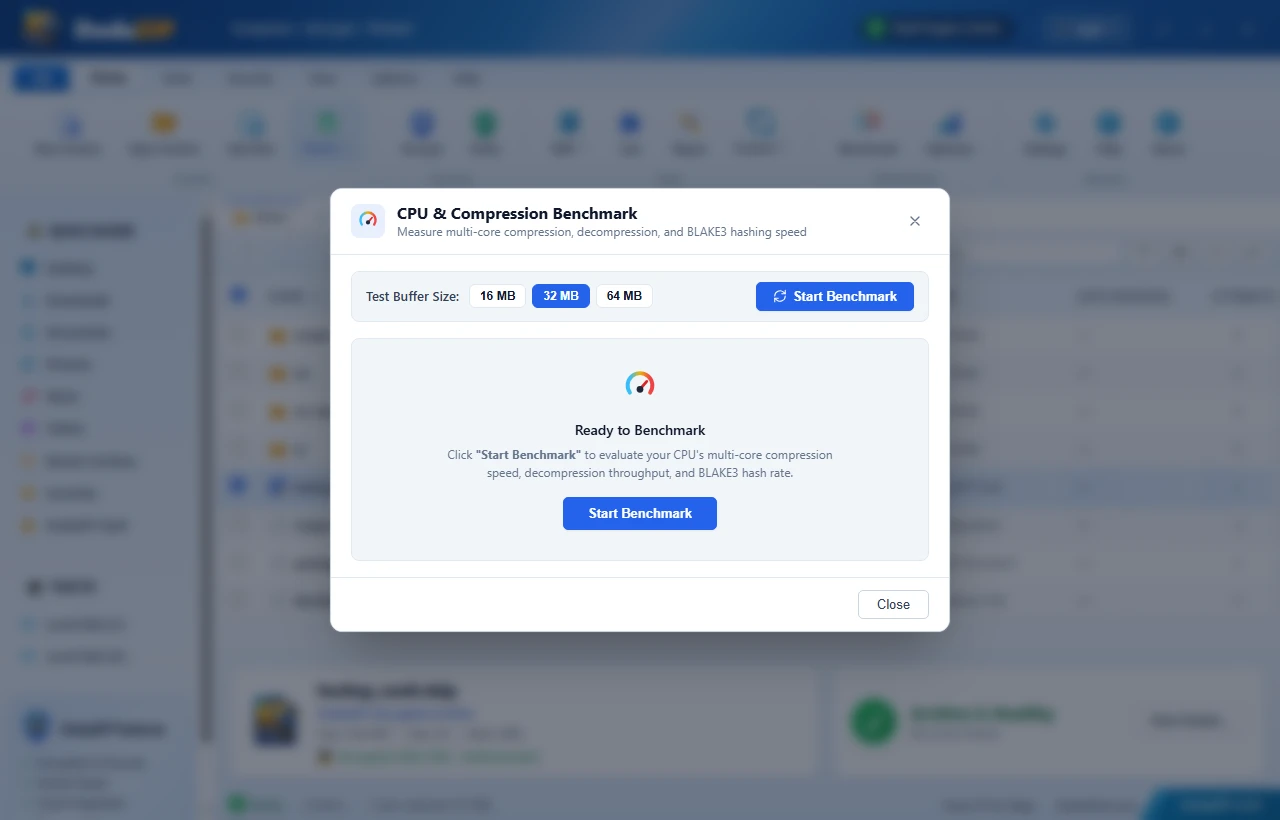
Live Multi-Core Throughput Diagnostics
Measures CPU core scaling, Zstandard compression MB/s, and cryptographic BLAKE3 verification speed under selectable 32MB / 64MB / 128MB test loads.
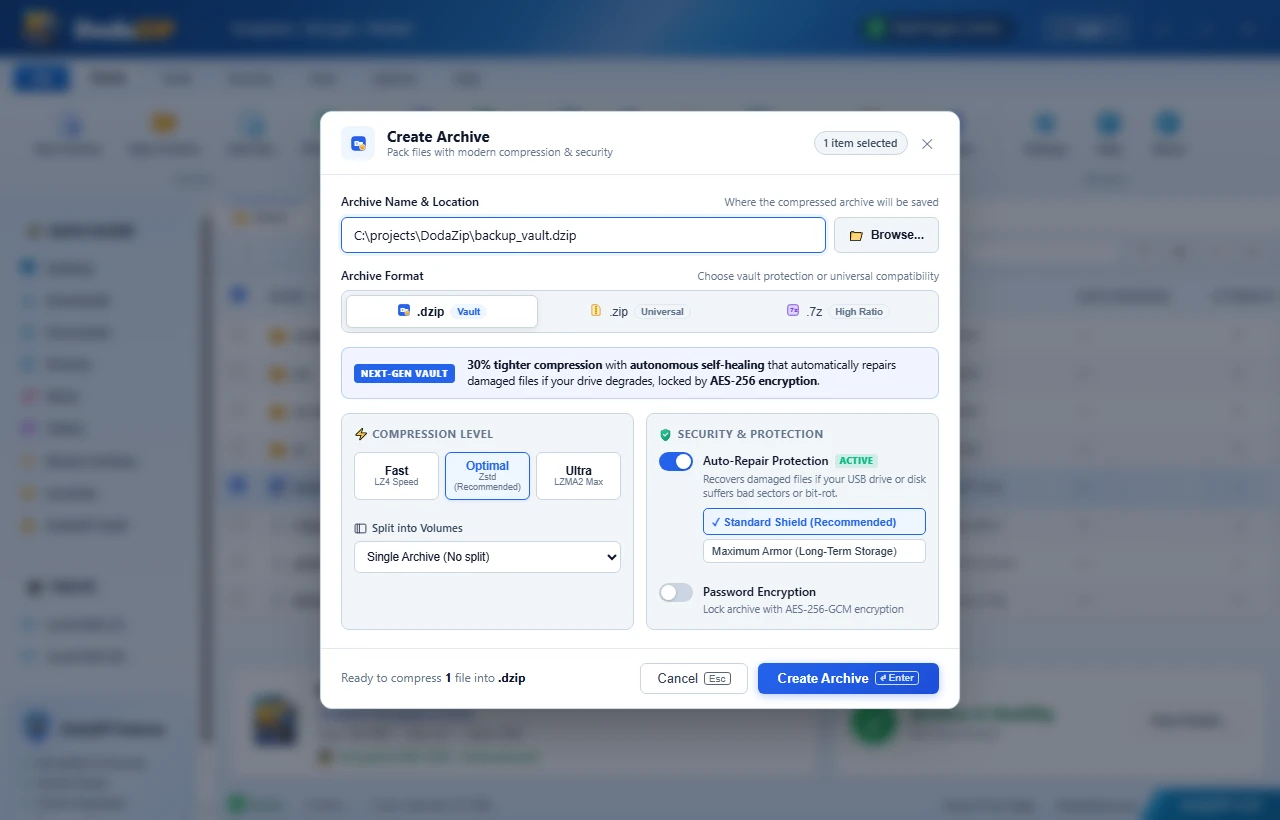
Next-Gen Archive Creator
Choose between Zstandard (fast) and LZMA2 (ultra) codecs, set Reed-Solomon self-healing parity levels, and encrypt both data and metadata with GPU-hard Argon2id.
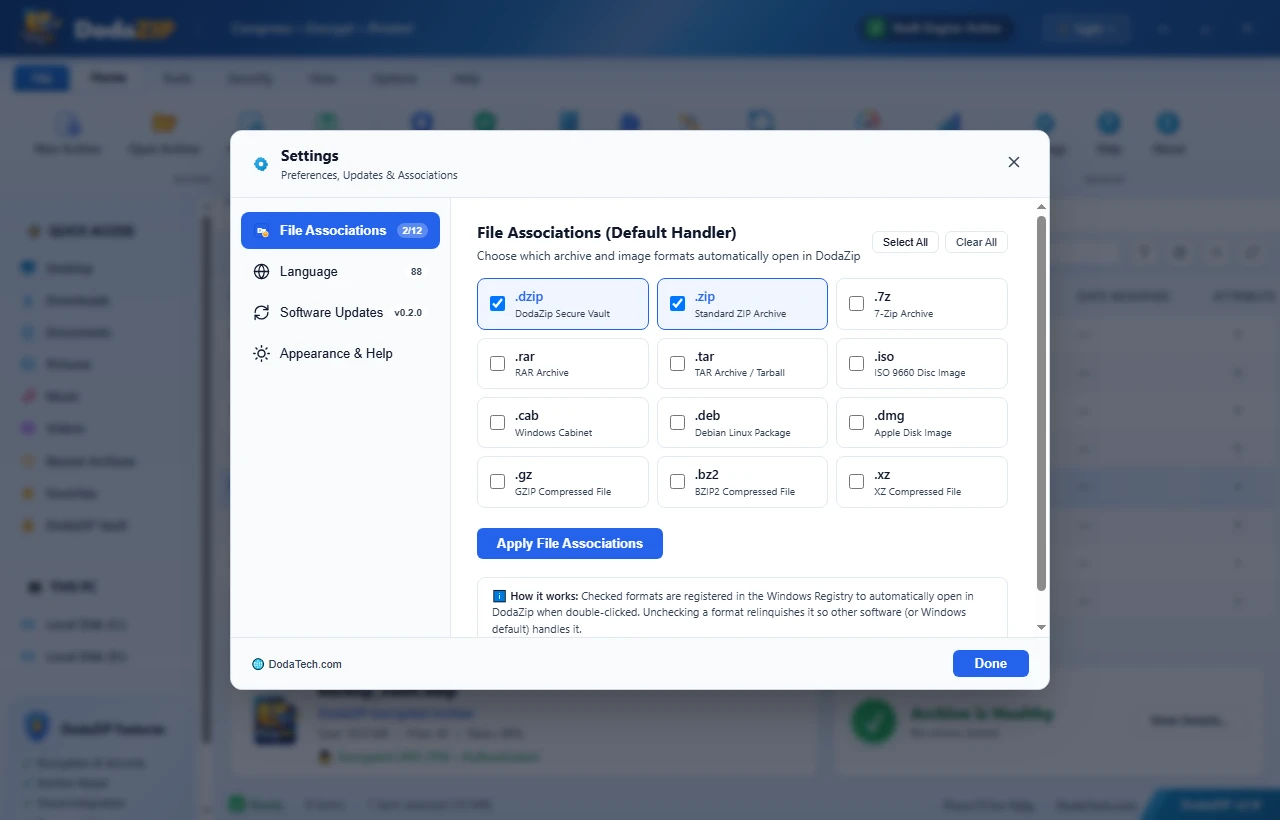
Instant Localization & Themes
Switch between 88 international languages on the fly, toggle Dark/Light/System Acrylic themes, manage Windows file associations, and configure auto-update frequency.
Native Right-Click Context Menu
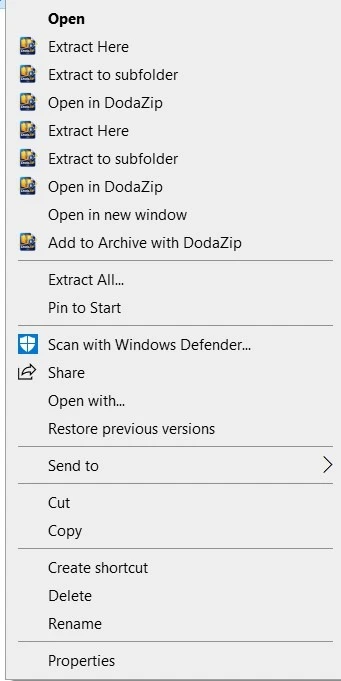
Right-click any archive or folder in Windows Explorer to immediately Extract Here, Extract to subfolder, or Add to Archive with DodaZip. Seamlessly auto-closes upon completion without leaving lingering windows.
Engineered with Modern Precision
Every tool you need for complete data integrity, extreme compression ratios, and airtight security.
Reed-Solomon Self-Healing (ECC)
Integrated parity shards mathematically reconstruct damaged or missing data chunks on the fly. Protects critical family photos, financial backups, and code repositories from silent bit rot.
Cross-File Deduplication (FastCDC)
Variable content-defined chunking hashes and matches blocks across multiple files. Repeated libraries, document versions, and virtual disk images are stored only once, saving up to 90% space.
Argon2id + XChaCha20-Poly1305
Military-grade AEAD authenticated encryption resistant to GPU brute-force cracking. Complete metadata shielding ensures filenames, directory structures, and sizes remain totally invisible.
3-Pass DoD 5220.22-M File Shredder
Normal deletion leaves plaintext on physical disk platters. DodaZip includes an integrated secure shredder that overwrites blocks with zeros, ones, and random bytes, plus NTFS MFT scrubbing.
CPU & Compression Benchmark
Built-in multi-threaded diagnostic suite. Tests real-time CPU performance, Zstandard compression/decompression throughput (MB/s), and BLAKE3 cryptographic verification speed.
Seamless Windows Shell Integration
Right-click context menu options in Windows Explorer: Open in DodaZip, Extract Here, Extract to subfolder, and Add to Archive with branded vault shield icons and auto-close.
Smart Unpack & Threat Shield
Prevents the dreaded "desktop explosion" zip bombs by automatically wrapping multi-root files in dedicated folders. Actively scans archives to flag deceptive scripts and executable payloads.
Universal 14-Format Support
Read and inspect foreign archives without extracting. Complete support for .dzip, .zip, .7z, .rar (including RAR5), .tar, .gz, .bz2, .xz, .iso, and .deb.
88 Global Languages Built-In
Complete native translation coverage. Switch instantly between English, Hindi, Spanish, French, German, Japanese, Chinese, Arabic, and 80 additional languages with one click in Settings.
DodaZIP vs. Legacy Archivers
Compare DodaZip against 7-Zip, WinRAR, and Windows Built-in ZIP.
| Capability | 🛡️ DodaZIP v0.2.0 | 📦 7-Zip | 🪟 Windows Built-in ZIP | 📁 WinRAR |
|---|---|---|---|---|
| Self-Healing ECC Recovery | ✓ Reed-Solomon | ✗ None | ✗ None | Recovery Record only |
| Cross-File Deduplication | ✓ FastCDC Native | Solid Block only | ✗ None | Solid Block only |
| Cryptographic Vault | ✓ Argon2id + XChaCha20 | AES-256 + PBKDF2 | Legacy ZipCrypto (weak) | AES-256 + PBKDF2 |
| Permanent File Shredder | ✓ 3-Pass DoD 5220.22-M | ✗ None | ✗ None | ✗ None |
| Modern Desktop GUI | ✓ Acrylic Tabs (Dark/Light) | Windows 98 Style | Basic Explorer Folder | Legacy Toolbar |
| Zip Bomb & Threat Guard | ✓ Smart Unpack + Shield | ✗ None | ✗ None | ✗ None |
| CPU & Compression Benchmark | ✓ Real-time Multi-threaded | ✓ LZMA Benchmark | ✗ None | ✓ Speed Benchmark |
| Implementation Language | ✓ 100% Memory-Safe Rust | C / C++ | Proprietary C++ | Proprietary C++ |
| Licensing | Free & Open Source (MIT/Apache) | Open Source (LGPL) | Proprietary OS lock-in | Paid Commercial ($29) |
Slash Cloud Storage & Backup Expenses
Cross-file deduplication and modern Zstandard compression directly lower AWS S3, Cloudflare R2, and backup drive bills.
Content-defined chunking eliminates repeated binary blocks in software repos and VM images.
An iterative 5 TB daily backup can shrink down to 1.2 TB, saving over $1,000 annually per storage node.
Store backups on inexpensive cold tiers with confidence. Reed-Solomon parity fixes corrupted sectors.
Replaces archiver, deduplicator, shredder, and diagnostic benchmark in a single clean binary.
Frequently Asked Questions
Everything you need to know about DodaZip and the .dzip vault format.
What is the .dzip format and why was it created?
.dzip is DodaZip's native archive container. It bundles Zstandard/LZMA2 compressed blocks, a FastCDC deduplication hash map, Argon2id + XChaCha20-Poly1305 encryption, and Reed-Solomon forward error correction parity. Unlike legacy formats, a .dzip file can self-heal damaged sectors and provides O(1) random-access extraction of single files.
Can DodaZip open my existing .zip, .7z, and .rar files?
Yes. DodaZip can read, inspect, and extract 14 industry-standard foreign formats, including ZIP, 7-Zip, RAR (including RAR5), TAR, GZIP, BZIP2, XZ, ISO, and Debian packages. You can browse inside any archive in the virtual explorer before extracting.
How does Windows Explorer integration work?
During installation (or via Settings), DodaZip registers context menu actions directly into Windows Explorer. When you right-click any archive or files, you can choose "Extract Here", "Extract to subfolder", or "Add to Archive with DodaZip". Context extractions run quickly, display progress, and automatically close when complete.
Is DodaZip completely free and open source?
Yes! DodaZip is released under the dual MIT and Apache 2.0 licenses. There are zero ads, zero telemetry, no paid upsells, and no trial limits. It can be freely used for personal, non-profit, or commercial enterprise workloads. The full source code is on GitHub.
Get DodaZip for Windows
Download the latest stable release (v0.2.0). Choose between the full setup installer or standalone portable edition.
Windows Setup Installer
Full installation with Windows Explorer right-click context menu, Start Menu shortcuts, and customizable file associations.
Download Setup (.exe) (4.46 MB)Portable Edition
Runs instantly from any folder or USB flash drive without administrator privileges or modifying the Windows Registry.
Download Portable (.zip) (5.10 MB)