DodaZIP Vault & Secure Containers
What Is a DodaZIP Vault?
A DodaZIP Vault (.dzip) is a next-generation encrypted container format engineered from the ground up in memory-safe Rust. While legacy archivers (ZIP, RAR, 7z) rely on encryption standards formulated decades ago, DodaZIP Vault addresses the fundamental vulnerabilities of modern data storage, cloud sync, and forensic file analysis.
A DodaZIP Vault is not merely a compressed zip file with a password—it is an authenticated, zero-knowledge cryptographic container featuring full directory metadata shielding, Argon2id memory-hard key derivation, XChaCha20-Poly1305 / AES-256-GCM AEAD encryption, FastCDC chunk-level deduplication, and Reed-Solomon self-healing parity.
💡 In Simple Terms: Suitcase vs. Steel Safe
If you are wondering what a Vault does in everyday language:
- “Add to Archive” is like packing clothes and papers into an ordinary suitcase. It shrinks files and keeps them neatly together so they are easy to email or move around.
- “DodaZIP Vault” is like locking your jewelry, passport, and cash inside a heavy steel safe. Nobody from the outside can see what is inside, how many items you have, or what they are called.
Are a password-protected
.dzipfile and a DodaZIP Vault the same thing?
Yes, exactly the same. Just as a “BitLocker Drive” is simply a hard drive with BitLocker encryption turned on, a DodaZIP Vault is simply a.dzipfile locked with a master password. “Vault” is the friendly name for your encrypted.dzipcontainer.
❓ Why Not Just Password-Protect a Normal .zip File?
Many users wonder: “If I can already put a password on an ordinary .zip file, why do I need a Vault?”
There are three major real-world differences:
1. Ordinary .zip Files Expose All Your File Names
In a standard password-protected .zip file, the 1989 ZIP format cannot hide file names or folder trees. Anyone who intercepts or receives your .zip file can open it in Windows Explorer or 7-Zip and immediately read every file name (such as Tax_Return_2025.pdf, Medical_Records.jpg, or Confidential_Salaries.xlsx). The software only asks for a password when someone attempts to extract or view the contents of an individual file.
(Note on 7-Zip: 7-Zip only asks for a password upfront before showing files if you create a proprietary .7z file and explicitly check “Encrypt file names”. Standard .zip files can never hide file names.)
In a DodaZIP Vault, both file contents and all file names, folder structures, timestamps, and sizes are completely locked inside a Zero-Knowledge Metadata Shield. A stranger inspecting a .dzip file sees nothing except randomized ciphertext blocks.
2. Standard .zip Passwords Can Be Cracked on Gaming GPUs
Standard .zip password encryption was created decades ago. Today, free open-source password cracking tools running on modern consumer gaming graphics cards (GPUs) can test billions of password guesses every single second.
A DodaZIP Vault uses Argon2id, a modern memory-hard cryptographic lock that requires 64 MB of physical RAM for every single guess. A password that might be broken in hours on an old .zip file would take millions of years to crack on a DodaZIP Vault.
3. Self-Healing Parity (Fixes Damaged Drives)
If an old USB thumb drive, hard drive, or cloud download suffers from bad sectors or flipped bits, an ordinary .zip file corrupts permanently with an “Archive Corrupt” error and your files are lost forever.
A DodaZIP Vault automatically includes Reed-Solomon Self-Healing Parity. If parts of your drive go bad, DodaZIP mathematically reconstructs the damaged bytes and rescues your files.
🧭 When Should You Use Which?
| Scenario | Use “Add to Archive” | Use “DodaZIP Vault” |
|---|---|---|
| Bundling everyday files or photos to email to a friend | ✅ | ❌ |
Sharing project files with Mac, Linux, or mobile users (.zip) | ✅ | ❌ |
| Shrinking large files to save disk space | ✅ | ❌ |
| Storing sensitive tax forms, IDs, banking papers, or passwords | ❌ | ✅ |
| Uploading backups to Cloud Storage (Google Drive, Dropbox, OneDrive) | ❌ | ✅ |
| Carrying confidential work or client files on a USB thumb drive | ❌ | ✅ |
| Archiving irreplaceable family photos for long-term safe-keeping | ❌ | ✅ |
🛡️ Why Legacy Archive Encryption Fails
Traditional archive formats provide a false sense of security. When storing confidential financial records, source code, client backups, or sensitive personal documents in standard .zip or .7z files, critical security flaws leave your data exposed:
| Security Threat | Standard ZIP / Legacy Utilities | DodaZIP Secure Vault (.dzip) |
|---|---|---|
| Plaintext Filenames & Structure | Filenames, directory hierarchy, timestamps, and file counts remain completely exposed in plaintext headers. | Zero-Knowledge Metadata Shield: Filenames, path hierarchies, sizes, and timestamps are completely encrypted. Snoopers see only randomized ciphertext blocks. |
| GPU / ASIC Cracking Rigs | Uses legacy PBKDF2 or weak ZipCrypto. Consumer GPU clusters can test billions of password attempts per second. | Argon2id Memory-Hard KDF: Enforces a 64 MB physical RAM buffer requirement per hash computation, neutralizing massive GPU and cloud cracking farms. |
| Silent Bit Rot & Data Corruption | Any flipped bit, bad storage sector, or transmission hiccup renders the archive permanently corrupt. | Reed-Solomon Self-Healing ECC: Mathematical parity shards automatically reconstruct damaged or missing data blocks during decompression. |
| Data Tampering & Injection | Lacks authenticated encryption (AEAD). Attackers can flip bits or inject malicious bytes without detection. | Poly1305 / AES-GCM AEAD Tags: Every block includes a 128-bit cryptographic authentication tag. Any single-bit tampering triggers immediate rejection. |
| Forensic Disk Residue (%TEMP%) | Standard tools extract entire archives to unencrypted temporary folders on disk before opening files. | In-Memory Virtual Inspection: Streams and decodes requested files in RAM without dumping plaintext artifacts to %TEMP%. |
| Redundant Backup Bloat | Identical files across multiple folders or archives are re-compressed repeatedly. | FastCDC Deduplication: Identifies and de-duplicates identical binary chunks across files, slashing vault footprint by 2–10×. |
🔒 The Core Security Architecture
+-------------------------------------------------------------------------------+
|                        DodaZIP Vault File (.dzip)                             |
+-------------------------------------------------------------------------------+
|  Header (48B)  | Magic: b"DODAZIP\0" | Flags (Encrypted, ECC, ChunkTable)    |
+----------------+--------------------------------------------------------------+
|  Crypto Block  | 16B Salt | Argon2id Params (m=65536, t=3, p=4)               |
+----------------+--------------------------------------------------------------+
|  Index Table   | BLAKE3 Content-Addressed Chunk Map (Encrypted & Authenticated)|
+----------------+--------------------------------------------------------------+
|  Payload Chunks| Deduplicated Data Blocks (XChaCha20-Poly1305 / AES-256-GCM)  |
|                | Each Chunk: 24-byte CSPRNG Nonce + 16-byte Poly1305 AEAD Tag |
+----------------+--------------------------------------------------------------+
|  Parity Shards | Reed-Solomon Erasure Coding Shards (Configurable 3% to 15%)   |
+----------------+--------------------------------------------------------------+
|  Dir Metadata  | Directory Hierarchy, File Attributes, Timestamps (Encrypted) |
+-------------------------------------------------------------------------------+
1. Zero-Knowledge Metadata Encryption
In a standard password-protected ZIP archive, anyone who receives the file or intercepts it during transmission can inspect the internal file list, seeing document names like Q4_Financial_Acquisition_Report.pdf or Employee_Salaries_2026.xlsx.
In a DodaZIP Vault, both file payload blocks and all directory metadata are sealed inside the encrypted boundary. An external observer cannot see:
- How many files are inside the vault.
- The names of any files or subdirectories.
- File sizes, compression ratios, or original timestamps.
2. Argon2id Key Derivation
DodaZIP utilizes Argon2id, the winner of the international Password Hashing Competition (PHC).
- Memory Cost:
65,536 KB(64 MB of dedicated RAM per hash derivation). - Time Cost:
3 iterations. - Parallelism:
4 threads. - Zero-Trace Disposal: Derived master keys are wrapped in Rust
Zeroizingwrappers, ensuring that cryptographic keys are forcefully overwritten with zeros in physical RAM as soon as the operation completes.
3. Authenticated Stream Encryption (AEAD)
DodaZIP defaults to XChaCha20-Poly1305, a modern stream cipher featuring an extended 192-bit (24-byte) nonce generated directly from the operating system’s Cryptographically Secure Pseudorandom Number Generator (OsRng).
- The extended 192-bit nonce eliminates the mathematical probability of nonce reuse, even across billions of generated files.
- Each chunk is paired with a 128-bit Poly1305 authentication tag that mathematically seals the data against replay, bit-flipping, and truncation attacks.
- High-performance AES-256-GCM hardware-accelerated via AES-NI instructions is also fully supported.
4. Integrated Self-Healing Parity (ECC)
Storage drives suffer from silent bit rot, electromagnetic degradation, and optical decay. DodaZIP Vaults can embed Reed-Solomon Galois Field GF(2^8) forward error correction parity directly within the .dzip container:
- Fast Parity (3%): Protects against small sector corruptions with near-zero size overhead.
- Medium Parity (8%): Recommended for long-term cold archives, NAS storage, and cloud backups.
- Maximum Parity (15%): Heavy-duty protection capable of reconstructing files even through substantial physical damage or data loss.
🖥️ Using DodaZIP Vault in Desktop GUI
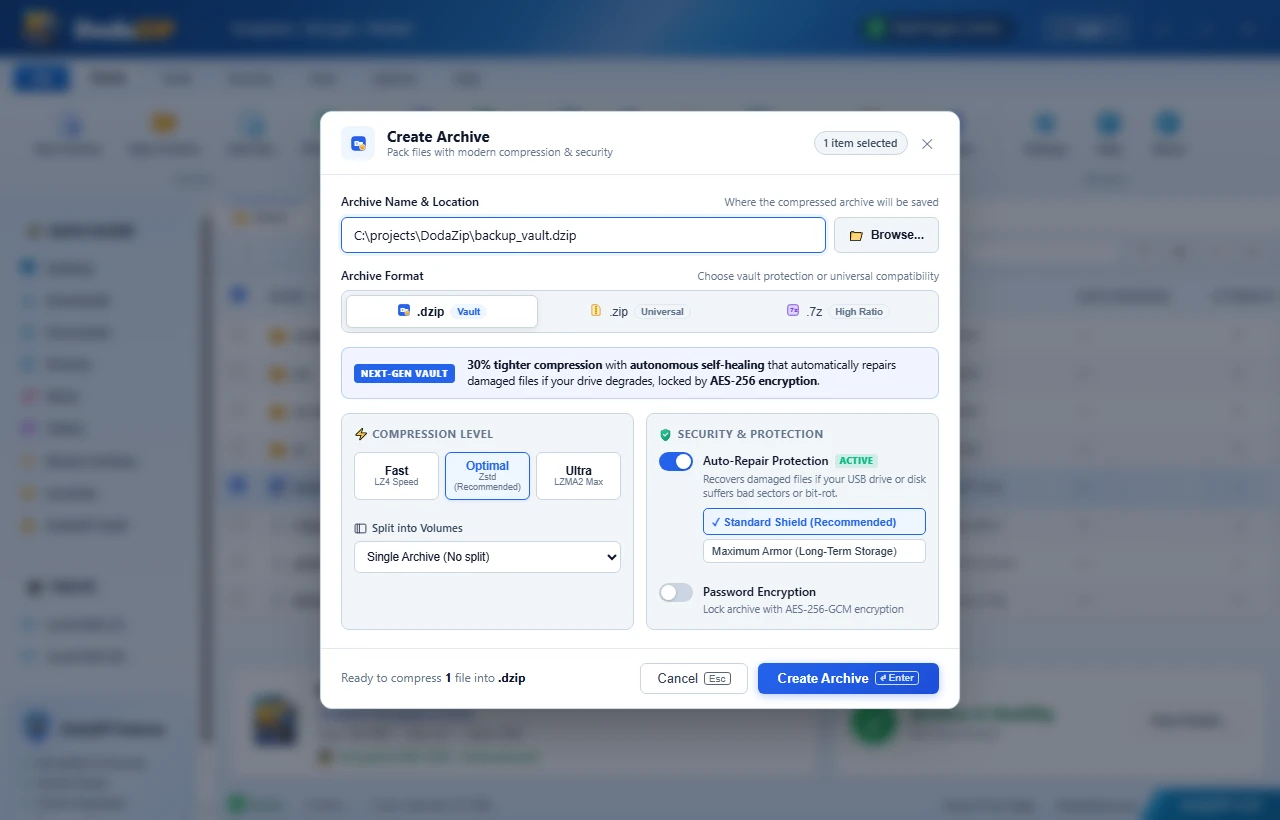
Creating a New Secure Vault
- Launch DodaZIP and select the files or folders you want to secure.
- Click New Archive in the ribbon or choose DodaZIP Vault from the sidebar.
- In the creation dialog:
- Choose the native
.dzipcontainer format (badged with the blue Vault tag). - Enter your Master Password.
- Select your preferred cryptographic cipher: XChaCha20-Poly1305 (recommended) or AES-256-GCM.
- Choose your Self-Healing ECC Parity level (None, Fast 3%, Balanced 8%, or Maximum 15%).
- Choose your compression level: Fast (Zstandard L1), Balanced (Zstandard L10), or Maximum (LZMA2 / Zstandard L22).
- Choose the native
- Click Create Archive. DodaZIP will deduplicate, compress, encrypt, and calculate self-healing parity in parallel.
In-Place Virtual Vault Browsing
Unlike legacy utilities that decompress an entire archive into Windows’ unencrypted %TEMP% folder before letting you view a file:
- Double-click any
.dzipvault in Windows Explorer or in DodaZIP. - Enter your master password when prompted.
- Browse folders, open individual documents, and preview items seamlessly. DodaZIP reads chunks directly into memory, leaving zero plaintext residue on disk.
The Luminous Vault Status Indicator
In the top right corner of the DodaZIP title bar, the green Vault Engine Active badge indicates that the cryptographic subsystem is primed and ready, enforcing zero-knowledge operations.
💻 Command-Line Interface (CLI) Usage
The standalone dodazip binary provides full command-line automation for secure vault management:
1. Create an Encrypted Vault
# Interactive password prompt with default XChaCha20-Poly1305 and Balanced ECC
dodazip c -i ./confidential-records -o secure-vault.dzip --password "YourMasterSecret123"

# Explicitly select AES-256-GCM cipher and Maximum 15% self-healing parity
dodazip c -i ./client-database -o db_vault.dzip --password "YourMasterSecret123" --cipher aes256-gcm --ecc max
2. Verify Vault Integrity & Parity Health
Run verification to test both cryptographic authentication tags and Reed-Solomon parity without writing anything to disk:
dodazip v secure-vault.dzip --password "YourMasterSecret123"3. Extract From a Vault
# Extract all files to a destination directory
dodazip x secure-vault.dzip -o ./unpacked/ --password "YourMasterSecret123"

# Extract with automatic self-repair if bit rot is detected
dodazip x secure-vault.dzip -o ./restored/ --repair --password "YourMasterSecret123"
4. Inspect Vault Directory Listing
dodazip l secure-vault.dzip --password "YourMasterSecret123"⚠️ Important Security Notice
DodaZIP strictly adheres to zero-knowledge cryptographic principles:
- Master passwords are used only in volatile memory to derive encryption keys through Argon2id.
- There is no master backdoor, key escrow, or administrative recovery option.
- If you lose or forget the master password, the mathematical entropy of Argon2id and XChaCha20-Poly1305 ensures that the vault contents are permanently unrecoverable. Keep a secure backup of your password in a trusted password manager.