Windows Shell Integration & Context Menu
Seamless Windows Explorer Integration
DodaZIP integrates directly into the Windows Shell, allowing you to manage, inspect, compress, and extract archives without having to open the main application window first.
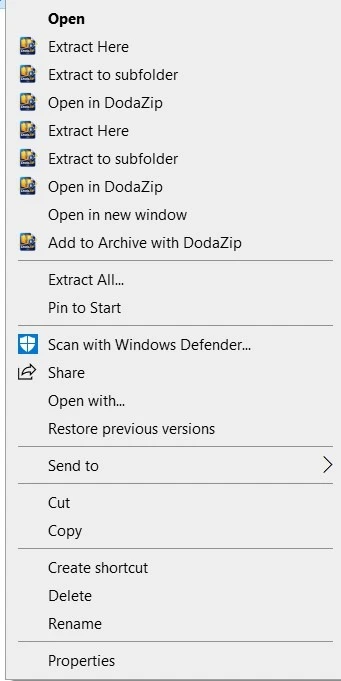
🪟 Explorer Context Menu Commands
When you right-click files or archives in Windows Explorer, DodaZIP provides fast, context-aware actions:
| Action | Applies To | Description |
|---|---|---|
| Open in DodaZip | Archives (.dzip, .zip, .7z, .rar, etc.) | Opens the archive in DodaZip’s Virtual Archive Explorer to inspect contents without extracting. |
| Extract Here | Archives | Automatically unpacks archive contents directly into the current folder, displays progress, and auto-closes. |
| Extract to subfolder | Archives | Creates a dedicated folder matching the archive name and extracts contents into it, then cleanly auto-closes. |
| Add to Archive with DodaZip | Any files or folders | Opens the Create Archive modal with all selected files pre-populated for compression. |
⚙️ File Associations
During installation, the setup wizard presents a dedicated File Associations screen allowing you to choose which archive formats your operating system (Windows, macOS, or Linux) opens with DodaZip by default:
.dzip(DodaZip Secure Vault).zip(Standard ZIP Archive).7z(7-Zip Archive).rar(WinRAR Archive).tar,.tar.gz,.tar.bz2,.tar.xz(Tarballs).gz,.bz2,.xz(Compressed Streams).iso,.dmg(Disc & Disk Images)
Note: You can update or toggle these file associations at any time in the DodaZip application under Settings → File Associations.