Backup, Restore & Security
Backup, Restore & Data Security
DodaMail is designed with complete local data sovereignty. You own your email database, configuration, and credentials. Unlike cloud clients that store your archive on remote proprietary servers, DodaMail provides comprehensive local backup, restore, and cryptographic security capabilities.
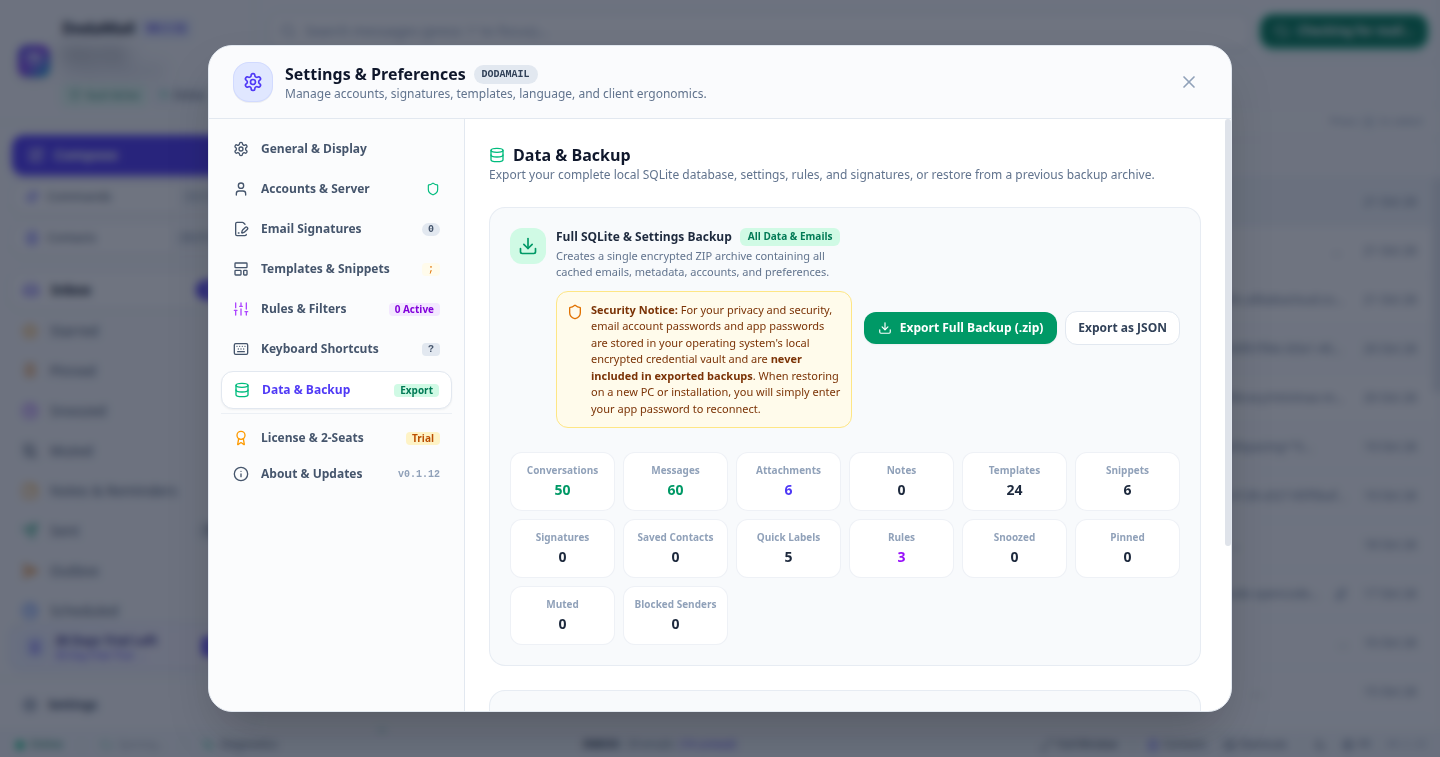
1. Simplified 2-Option Backup Engine (backup.ts)
To eliminate confusion and ensure seamless cross-platform compatibility, DodaMail provides two streamlined export options under Settings -> Data & Backup:
| Option | Format | Description & Contents |
|---|---|---|
| Export Full Backup (.zip) | Standard PKZIP | Creates a single standardized ZIP archive bundling your complete local SQLite database, messages, metadata, contacts, templates, snippets, and rules together with a human-readable README.txt. Ideal for full machine migrations and long-term offline archival. |
| Export as JSON (.json) | Portable JSON | Generates a lightweight JSON export containing your custom rules, signatures, snippets, labels, and interface preferences. Ideal for setting up a secondary machine without transferring gigabytes of cached email bodies. |
Important
Operating System Credential Vault Security Notice:
For your privacy and security, email account passwords and app passwords are stored in your operating system’s local encrypted credential vault (GNOME Keyring / Secret Service on Linux, Windows Credential Manager on Windows, and Apple Keychain on macOS). Passwords are never included in exported backups. When restoring on a new PC or installation, you will simply enter your app password to reconnect.
2. Real-Time Backup Metrics
When you open Settings -> Data & Backup, DodaMail displays a live metric summary of your local database:
- Conversations: Total email threads indexed in SQLite.
- Messages: Total individual message records stored locally.
- Attachments: Locally cached attachments and thumbnails.
- Templates & Snippets: Configured quick-replies and text expansions.
- Quick Labels: Custom user labels and color tags.
- Rules: Active filtering automation routines.
3. Restoring from a Backup Archive
When you click Restore from Backup:
- Select your
.zipor.jsonfile from the system file explorer. - DodaMail decompresses the archive into an isolated staging buffer and verifies that:
- The archive version matches or is cleanly migratable to the current schema.
- The SQLite database header and table indexes pass integrity checks.
- A confirmation modal prompts you to confirm replacing local data.
- Clicking Confirm & Restore replaces the active database and immediately triggers a hot-reload of the interface.
4. Operating System Credential Vault Integration
DodaMail never writes plaintext passwords to configuration files, disk logs, or unencrypted tables. All server passwords, OAuth tokens, and secret keys are delegated directly to the native OS keyring:
| Operating System | Native Credential Vault Architecture |
|---|---|
| Linux | GNOME Keyring / FreeDesktop Secret Service via libsecret |
| Windows | Windows Credential Manager (CredWrite / CredRead API) |
| macOS | Apple Keychain Services (SecItemAdd / SecItemCopyMatching) |
Security Benefits
- Zero Plaintext Footprint: Even if an unauthorized party copies your SQLite file, they cannot extract your email account passwords.
- Biometric & OS Authentication: Unlocking credentials leverages your existing OS login password, Windows Hello (Fingerprint/PIN), or Touch ID on macOS.
- Sandboxed Process Isolation: Each operating system enforces strict inter-process access controls around vault secrets.\n