Licensing & Seat Management
DodaBackup is distributed under an honest, customer-first licensing model. We believe software utilities should be one-time purchases with lifetime updates, not ongoing subscription burdens.
Editions & Pricing
DodaBackup is available on the DodaTech Store DodaBackup Page in two transparent editions:
| License Edition | Active Seats | Regular Price | Launch Promo (FLAT30) | Key Features |
|---|---|---|---|---|
| Single PC Lifetime License | 1 Computer | $13.99 | $9.79 (30% OFF) | Complete backup & sync suite for 1 PC. Lifetime free updates included. Transferable anytime. |
| Family / Power Pack | 3 Computers | $27.99 | $19.59 (30% OFF) | Covers up to 3 PCs under one unified key. Only $6.53 per computer. Lifetime free updates on all devices. |
Tip
Use Coupon Code FLAT30:
Enter promo code FLAT30 during checkout on store.dodatech.com to receive an instant 30% discount. All licenses include Lifetime Free Updates with zero renewal fees. You can review how automatic updates operate in our Cloudflare R2 & Automated Updates Guide.
30-Day Free Evaluation
When you complete initial installation (see Getting Started), an unrestricted 30-day evaluation period begins automatically:
- Zero Restrictions: All four synchronization modes (Two-Way, Mirror, Incremental, and Continuous Watcher), multi-threading, file filters, and scheduler tools are 100% unlocked.
- No Credit Card Required: You do not need an account or payment method to evaluate.
- Permanent Restore Guarantee: Even after day 30, the Restore Engine remains completely operational forever. Review our Restore & Data Recovery Pledge.
Zero Hardware & RAM Lockout
Legacy software licenses bind to CPU serial numbers, motherboard IDs, or RAM module configurations. When users upgraded their RAM or swapped a failing SSD, their license would break.
DodaBackup uses a modern, non-invasive Device Identity:
- Generates a persistent installation UUID (
DB-NODE-XXXXXXXX-XXXX) stored across protected application data stores. - Upgrading your RAM, replacing your graphics card, or cloning your hard drive to an NVMe SSD never invalidates your license.
- Uses native Windows WinINet APIs to communicate directly with
store.dodatech.comvia TLS, completely bypassing browser sandbox and CORS restrictions.
Activating Your License Key
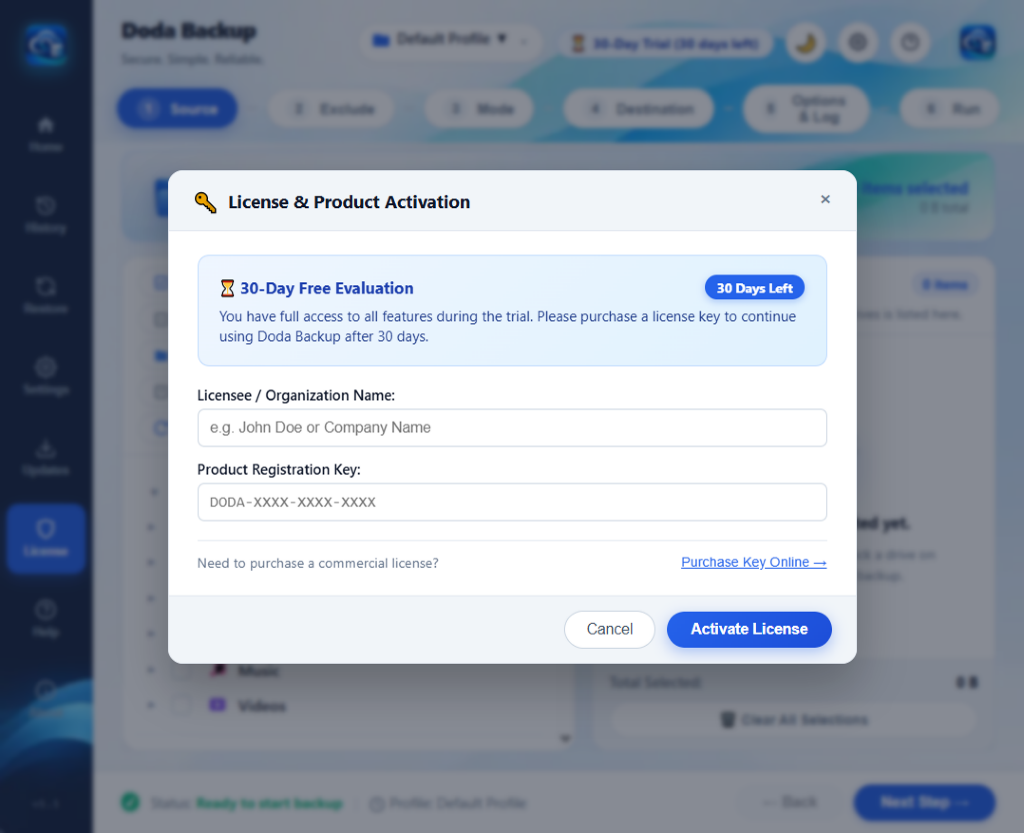
Upon completing your purchase on store.dodatech.com, your license key is delivered instantly via email and on the order confirmation screen.
Keys follow the deterministic algorithmic format:
DODA-PRO-XXXX-XXXX-YYYYTo activate:
- Open DodaBackup and click License on the left navigation rail or press
Ctrl + L(see Keyboard Shortcuts). - Enter your Full Name / Company and Email Address.
- Paste your license key into the activation field. (The input automatically formats uppercase and hyphens).
- Click Activate License.
- The native engine registers your computer with
store.dodatech.comand displays your active seat confirmation.
1-Click Seat Migration & Transfers
If you reach your seat limit (e.g., trying to activate a 2nd computer on a Single PC license, or a 4th computer on a Family Pack), DodaBackup makes transferring seats effortless:
    graph TD
    A["New Computer Enters License Key"] --> B["Contact store.dodatech.com"]
    B --> C{"Seats Available?"}
    C -->|Yes| D["Activated Successfully!"]
    C -->|Limit Reached| E["Display Active Devices List"]
    E --> F["User Clicks 'Transfer Here' on Old Device"]
    F --> G["Server Releases Old Device Seat"]
    G --> H["New Computer Claimed Seat Atomically!"]
- When the seat limit is reached, DodaBackup queries
store.dodatech.comand displays the list of currently authorized computers (with computer name and activation date). - Click Transfer Here next to any computer you wish to retire or replace.
- The server atomically reassigns the seat to your new computer with zero customer support delay.
- Alternatively, you can click Deactivate This PC on an old computer before selling or wiping it.
Offline Verified Grace Period
For security workstations, industrial control environments, or field laptops operating without internet access:
- DodaBackup contains an on-device CRC-16/CCITT-FALSE cryptographic checksum engine seeded with
DODASEED2026. - If an air-gapped machine enters a mathematically valid license key while disconnected from the internet, DodaBackup activates in Offline Verified Mode.
- Grants a 30-day offline grace period. When the computer reconnects to the internet, it silently syncs seat state with
store.dodatech.comin the background without user intervention. - For managing startup and offline backup behaviors, visit Application Settings.